



Introduction
Modern & Responsive Tailwind CSS Admin Template for All Your Web Projects
Vyzor is a premium Tailwind CSS Admin Template that combines modern and minimal design with full flexibility and responsiveness. It’s crafted using HTML5,CSS3, and Tailwind CSS, offering seamless customization with SASS integration. Whether you’re building a web application, admin dashboard, or project management platform, this template ensures your site stands out with ease.
Support and Updates:
When you purchase Vyzor, you gain access to free future updates to ensure your template remains up-to-date. Plus, our support team is always ready to assist with any questions.
Dependencies for Vyzor
What Do You Get with the Vyzor:
Vyzor provides all necessary HTML, CSS, SCSS, JS files, along with detailed Documentation to help you easily customize and implement the template.
Vyzor Compatibility with Popular Browsers:
Vyzor is fully compatible with major browsers, ensuring a seamless user experience across Chrome, Firefox, Safari, Edge, and Opera.
Folder Structure
Html Structure
General HTML file structure of the Vyzor template .Root:src/html/empty.html
html
    @SPK@include("partials/mainhead.html")

        </head>

        <body>

            <div class="progress-top-bar"></div>


            @SPK@include("partials/switcher.html")
            @SPK@include("partials/loader.html")

            <div class="page">
                @SPK@include("partials/header.html")
                @SPK@include("partials/sidebar.html")

                <!-- Start::app-content -->
                <div class="main-content app-content">
                    <div class="container-fluid page-container main-body-container">

                        <!-- Page Header -->
                        <div class="page-header-breadcrumb mb-3">
                            <div class="flex items-center justify-between flex-wrap">
                                <h1 class="page-title font-medium fs-[18px] mb-0">Empty</h1>
                                <ol class="breadcrumb mb-0">
                                    <li class="breadcrumb-item"><a href="javascript:void(0);">Pages</a></li>
                                    <li class="breadcrumb-item active" aria-current="page">Empty</li>
                                </ol>
                            </div>
                        </div>
                        <!-- Page Header Close -->

                        <!-- Start::row-1 -->
                        <div class="grid grid-cols-12 gap-x-6">
                            <div class="xl:col-span-12">
                                <div class="box">
                                    <div class="box-body">
                                        <h6 class="mb-0">EMPTY CARD</h6>
                                    </div>
                                </div>
                            </div>
                        </div>
                        <!--End::row-1 -->

                    </div>
                </div>
                <!-- End::app-content -->


                @SPK@include("partials/footer.html")
                @SPK@include("partials/responsive-search-modal.html")

            </div>

            @SPK@include("partials/commonjs.html")

            @SPK@include("partials/custom_switcherjs.html")

            <!-- Custom JS -->
            <script src="../assets/js/custom.js"></script>

        </body>

        </html>
Vyzor comes with power of Gulp
Gulp is a powerful JavaScript task runner used to automate development workflows such as compiling assets, minifying files, and optimizing resources with flexible and customizable tasks. Check here.
Prerequisites:
To install and set up all the prerequisites, follow these steps:
Ensure that Node.js is installed and running on your computer. If Node.js is already installed, you can skip this step. Otherwise, install it on your computer.
If you want to install and use the latest version of Node.js, you can find the necessary instructions on the official website.
To set up gulp, you need to install it globally on your system. Run one of the following commands in your terminal:
code
npm install -g gulpcode
npm install --save-dev gulpInstallation
Please follow below steps to install and setup all pre requisites:
Make sure to have all above pre requisites installed & running in your computer
Open your terminal, go to your folder and enter below command. This would install all required dependencies in node_modules folder.
code
npm installBuild Production File
After completing the above steps, run the following command from the project root (Vyzor/src) in your terminal or command prompt:
code
gulpNote:-Ensure all required node_modules are installed to run the gulp tasks successfully.
The following command performs several tasks to streamline your development workflow below are some of the task it performs :
- Generates the
dist/directory - Starts the local development server
- Watches for changes in the
src/folder (HTML, JavaScript, SCSS, etc.) - Automatically reflects those changes in the
dist/output for live development
FAQ'S
If you don't want to use scss files,you are in no need of Gulp and other related files & folders so please remove below shown files
You can simply use dist folder with only css, or can use by renaming it😊.
Step 1:
Go To style.scss (src/assets/scss/styles.scss )
if you want to change another font-family Go to the site Google Fonts And Select One font Family and import in to styles.scss file
How to Select font Family
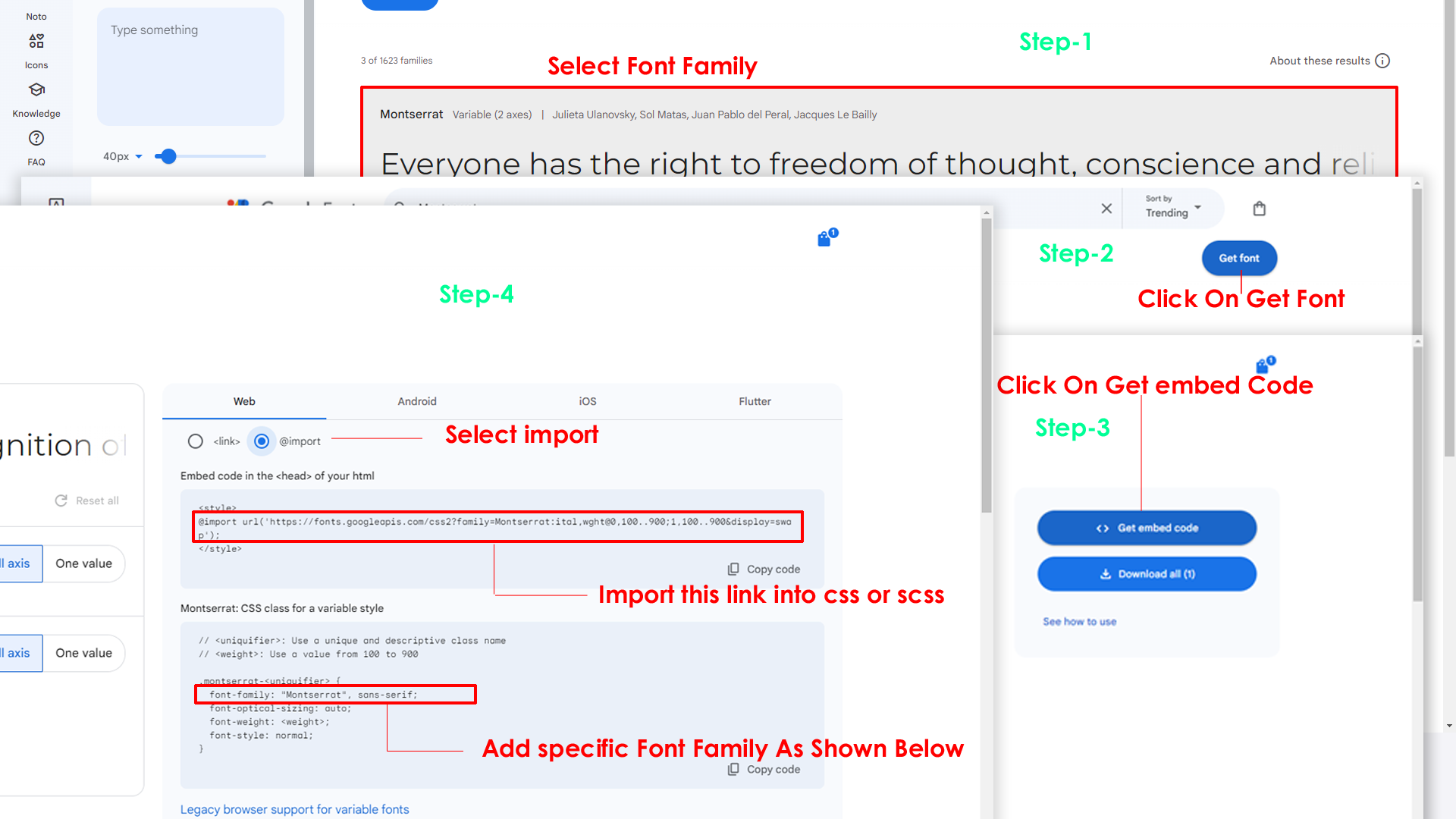
Step 2:
And paste Your Selected font-family in style.scss

Step 3:
And add the Your Selected font-family in _tailwind.css(src/assets/scss/_tailwind.css)
code
--font-defaultfont: "Space Grotesk", sans-serif;By default menu icons are phosphoricons if you want to change To change Menu icons, open sidebar.html page Path:src/html/partials/sidebar.html and go through app-sidebar section, in that section you will find phosphoricons of menu in svg tag, there you can replace previous icon with your icon. Example as shown in below
html
html
Go To "src/assets/images/brand-logos" folder and replace
your
logo with Previous Logos within in image size.
note: Please don't increase logo sizes. Replace your logo within
given
image size. otherwise the logo will not fit in particular place it
disturbs the template design.
Step1:
To clear LocalStorage loading functions you need to remove
localStorageBackup2() function in custom-switcher.min.js assets/js/custom-switcher.min.js as shown
below
javascript
function localStorageBackup2() {}Step2:
To remove complete LocalStorage saving you need to remove
all localstorage related calling functions like localStorage.setItem,
localStorage.removeItem, localStorage.getItem,
localStorage.clear in
custom-switcher.js
assets/js/custom-switcher.min.jsfile.Below are the some examples to find out.
javascript
localStorage.setItem( );
localStorage.removeItem( );
localStorage.getItem( )
localStorage.clear();
localStorageBackup();
Step3:
To remove complete LocalStorage saving you also need to remove
main.js link present in mainhead.html Path:html/partials/mainhead.html as shown below
html
<script src="../assets/js/main.js"></script>Step1:
To remove switcher icons remove below code shown in header.html html/partials/header.html file
html
 <!-- Start::header-element -- >
    <li class="header-element">
        <!-- Start::header-link|switcher-icon -->
        <a href="javascript:void(0);" class="header-link switcher-icon" data-bs-toggle="offcanvas" data-bs-target="#switcher-canvas">
            <svg xmlns="http://www.w3.org/2000/svg" class="header-link-icon" viewBox="0 0 256 256"><rect width="256" height="256" fill="none"/><path d="M207.86,123.18l16.78-21a99.14,99.14,0,0,0-10.07-24.29l-26.7-3a81,81,0,0,0-6.81-6.81l-3-26.71a99.43,99.43,0,0,0-24.3-10l-21,16.77a81.59,81.59,0,0,0-9.64,0l-21-16.78A99.14,99.14,0,0,0,77.91,41.43l-3,26.7a81,81,0,0,0-6.81,6.81l-26.71,3a99.43,99.43,0,0,0-10,24.3l16.77,21a81.59,81.59,0,0,0,0,9.64l-16.78,21a99.14,99.14,0,0,0,10.07,24.29l26.7,3a81,81,0,0,0,6.81,6.81l3,26.71a99.43,99.43,0,0,0,24.3,10l21-16.77a81.59,81.59,0,0,0,9.64,0l21,16.78a99.14,99.14,0,0,0,24.29-10.07l3-26.7a81,81,0,0,0,6.81-6.81l26.71-3a99.43,99.43,0,0,0,10-24.3l-16.77-21A81.59,81.59,0,0,0,207.86,123.18ZM128,168a40,40,0,1,1,40-40A40,40,0,0,1,128,168Z" opacity="0.2"/><circle cx="128" cy="128" r="40" fill="none" stroke="currentColor" stroke-linecap="round" stroke-linejoin="round" stroke-width="16"/><path d="M41.43,178.09A99.14,99.14,0,0,1,31.36,153.8l16.78-21a81.59,81.59,0,0,1,0-9.64l-16.77-21a99.43,99.43,0,0,1,10.05-24.3l26.71-3a81,81,0,0,1,6.81-6.81l3-26.7A99.14,99.14,0,0,1,102.2,31.36l21,16.78a81.59,81.59,0,0,1,9.64,0l21-16.77a99.43,99.43,0,0,1,24.3,10.05l3,26.71a81,81,0,0,1,6.81,6.81l26.7,3a99.14,99.14,0,0,1,10.07,24.29l-16.78,21a81.59,81.59,0,0,1,0,9.64l16.77,21a99.43,99.43,0,0,1-10,24.3l-26.71,3a81,81,0,0,1-6.81,6.81l-3,26.7a99.14,99.14,0,0,1-24.29,10.07l-21-16.78a81.59,81.59,0,0,1-9.64,0l-21,16.77a99.43,99.43,0,0,1-24.3-10l-3-26.71a81,81,0,0,1-6.81-6.81Z" fill="none" stroke="currentColor" stroke-linecap="round" stroke-linejoin="round" stroke-width="16"/></svg>
        </a>
        <!-- End::header-link|switcher-icon -->
    </li>
    <!-- End::header-element -- >
Step2:
After removing code in header.html page remove switcher.html partial link shown below in every html page
html
@SPK@include("partials/switcher.html")Step3:
After removing switcher partial in every page also remove custom_switcherjs.html partial in every html page
html
@SPK@include("partials/custom_switcherjs.html")Step4:
Remove main.js link present in mainhead.html Path:html/partials/mainhead.html as show below
html
<script src="../assets/js/main.js"></script>Step5:
Finally remove below shown code in custom.js file Path:assets/js/custom.js
javascript
/* for theme primary */
        Remove Between Code
    /* for theme primary */

    /* for theme background */
        Remove Between Code
/* for theme background */Step1:
Remove below shown code in head part of the landing.html file Path:src/html/landing.html
javascript
<script>
    if (localStorage.vyzordarktheme) {
        document.querySelector("html").setAttribute("class", "dark")
    }
</script>
Step2:
Remove below code from landing.js file Path:src/js/landing.js
javascript
/*------swipter-js-----*/
    Remove Code Between
    /*------swipter-js-----*/
Step3:
Remove below shown code in app-sidebar of landing.html file Path:src/html/landing.html
html
<a href="javascript:void(0);" class="ti-btn ti-btn-icon ti-btn-primary-light ti-btn-wave !font-medium switcher-icon m-0 p-2 px-3" data-hs-overlay="#switcher-canvas" aria-expanded="false">
        <i class="ti ti-settings"></i>
    </a>
Step4:
Remove below shown code in app-header of landing.html file Path:src/html/landing.html
html
<a href="javascript:void(0);" class="ti-btn ti-btn-icon ti-btn-success ti-btn-wave !font-medium switcher-icon m-0 p-2 px-3" data-hs-overlay="#switcher-canvas" aria-expanded="false">
    <i class="ri-settings-3-line"></i>
</button>Please follow the below steps to change Primary Color
Step 1 :
To change Primary Color you have to open _tailwind.css file and replace what color you want as shown in below
Rootpath : _tailwind.css (src/assets/scss/_tailwind.css )

Please follow the below steps to change Dark body Color
Step 1 :
Make sure the theme is set completely to dark mode by adding the following attributes to the html tag class="dark" data-header-styles="dark" data-menu-styles="dark"
Step 2 :
To change Dark body Color you have to open _tailwind.css file and replace what color you want as shown in below
Rootpath : _tailwind.css (src/assets/scss/_tailwind.css )
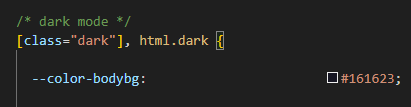
Step 3 :
Also Change the following variable colors to the desired theme background accordingly in [class="dark"]
--color-light : --color-formcontrolbg : --color-bodybg2 : --color-bodybg : --color-customblack : --color-customwhite :Credit's
Icons Credit
| Icons | References |
|---|---|
| Bootstrap Icons | https://icons.getbootstrap.com/ |
| Boxicons | https://boxicons.com/ |
| Remix Icons | https://remixicon.com/ |
| Feather Icons | https://feathericons.com/ |
| Tabler Icons | https://tabler-icons.io/ |
| Line Awesome Icons | https://icons8.com/line-awesome |
| Phosphor Icons | https://phosphoricons.com/ |
Images Credit
| Images | References |
|---|---|
| Vecteezy | https://www.vecteezy.com/ |
| Iconscount | https://iconscout.com/ |
| Unsplash | https://unsplash.com/ |
| Png Tree | https://pngtree.com/ |
| flaticon | https://www.flaticon.com/authors/flat-icons |
| freepik | https://www.freepik.com |
Fonts Credit
| Font | References |
|---|---|
| Google Fonts | https://fonts.google.com/ |
Sidemenu Icons
| Icon | References |
|---|---|
| phosphor Icons | https://phosphoricons.com/ |
Switcher styles
(Root:html/partials/mainhead.html)
html
<html lang="en" dir="ltr" data-nav-layout="vertical" class="light" data-header-styles="transparent" data-width="fullwidth" data-menu-styles="transparent" data-page-style="flat" data-toggled="close" data-vertical-style="doublemenu" data-toggled="double-menu-open">html
class="light" data-header-styles="light" data-menu-styles="light"html
class="dark" data-header-styles="dark" data-menu-styles="dark"html
dir="ltr"html
dir="rtl"html
data-nav-layout="vertical"html
data-nav-layout="horizontal" data-nav-style="menu-click"html
data-page-style="regular"html
data-page-style="classic"html
data-page-style="modern"html
data-page-style="flat"html
data-width="default"html
data-width="full-width"html
data-width="boxed"html
data-header-position="fixed"html
data-header-position="scrollable"html
data-vertical-style="closed"html
data-vertical-style="icontext"html
data-vertical-style="overlay"html
data-vertical-style="detached"html
data-vertical-style="doublemenu"html
loader="enable"html
loader="disable"html
data-menu-styles="light"html
data-menu-styles="dark"html
data-menu-styles="color"html
data-menu-styles="gradient"html
data-menu-styles="transparent"html
data-header-styles="light"html
data-header-styles="dark"html
data-header-styles="color"html
data-header-styles="gradient"html
data-header-styles="transparent"html
data-bg-img="bgimg1"html
data-bg-img="bgimg2"html
data-bg-img="bgimg3"html
data-bg-img="bgimg4"html
data-bg-img="bgimg5"Choices JS :
Choices JS is very simple javascript plugin to style default select..
html
css
js
plugin link
https://choices-js.github.io/Choices/Reference Link
https://www.npmjs.com/package/choices.jsSwiper JS :
Swiper JS is very modern javascript plugin to replace bootstrap carousel..


html
css
js
Plugin Link
https://swiperjs.com/Reference Link
https://www.npmjs.com/package/swiperSweet Alerts :
Sweet Alerts is a modern javascript plugin for alert messages..
html
css
js
Plugin link
https://sweetalert2.github.io/Reference Link
https://www.npmjs.com/package/sweetalert2noui slider :
noui slider is a modern javascript plugin for alert messages..
html
css
js
<!-- noUiSlider JS -->
<script src="../assets/libs/nouislider/nouislider.min.js"></script>
<script src="../assets/libs/wnumb/wNumb.min.js"></script>

/* default slider */
var slider = document.getElementById('slidermain');
noUiSlider.create(slider, {
    start: [30, 80],
    connect: true,
    range: {
        'min': 0,
        'max': 100
    }
});
Plugin link
https://refreshless.com/nouislider/Reference Link
https://www.npmjs.com/package/nouisliderFlatPickr :
FlatPickr is a modern javascript plugin alternative for date and time pickers..
html
css
js
/* To choose date */
flatpickr("#date", {});Plugin link
https://flatpickr.js.org/examples/Reference Link
https://www.npmjs.com/package/flatpickrsimonwep/pickr(ColorPicker) :
It is a modern javascript color picker..
html
css
js
Plugin link
https://simonwep.github.io/pickr/Reference Link
https://www.npmjs.com/package/@simonwep/pickrGLightbox (Gallery) : :
GLightbox is a modern javascript gallery plugin..
html
css
js
    var lightboxVideo = GLightbox({
        selector: '.glightbox'
    });
    lightboxVideo.on('slide_changed', ({ prev, current }) => {
        console.log('Prev slide', prev);
        console.log('Current slide', current);

        const { slideIndex, slideNode, slideConfig, player } = current;
    });
Plugin link
https://biati-digital.github.io/glightbox/Reference Link
https://www.npmjs.com/package/glightboxFull Calendar :
Full Calendar is a modern javascript calendar plugin..
html
js
   <!-- Moment JS -->
   <script src="../assets/libs/moment/min/moment.min.js"></script>

   <!-- Fullcalendar JS -->
   <script src="../assets/libs/fullcalendar/index.global.min.js"></script>
   <script src="../assets/js/fullcalendar.js"></script>
Plugin link
https://fullcalendar.io/Reference Link
https://www.npmjs.com/package/fullcalendarLeaflet Maps :
Leaflet Maps is a modern javascript maps plugin..
html
css
js
<!-- Leaflet Maps JS -->
<script src="../assets/libs/leaflet/leaflet.js"></script>

    /* default map */
    var map = L.map('map').setView([51.505, -0.09], 13);
    L.tileLayer('https://{s}.tile.openstreetmap.org/{z}/{x}/{y}.png', {
        maxZoom: 18,
        attribution: '© OpenStreetMap'
    }).addTo(map);
Plugin link
https://leafletjs.com/Reference Link
https://www.npmjs.com/package/leafletJsvector Maps :
Jsvector Maps is a modern javascript maps plugin..
html
css
js
<!-- JSVector Maps JS -->
    <script src="../assets/libs/jsvectormap/js/jsvectormap.min.js"></script>

    <!-- JSVector Maps MapsJS -->
    <script src="../assets/libs/jsvectormap/maps/world-merc.js"></script>

    /* basic vector map */
    var map = new jsVectorMap({
    selector: "#vector-map",
    map: "world_merc",
    });
Plugin link
https://jsvectorjs.com/Reference Link
https://www.npmjs.com/package/jsvectormapGmaps.js :
gmaps is a modern javascript maps plugin..
html
js
 <!-- Google Maps API -->
<script src="https://maps.google.com/maps/api/js?key=AIzaSyCW16SmpzDNLsrP-npQii6_8vBu_EJvEjA"></script>
<script src="../assets/libs/gmaps/gmaps.min.js"></script>

/* basic map */
var map = new GMaps({
    el: '#google-map',
    lat: -12.043333,
    lng: -77.028333
});
Plugin link
https://hpneo.dev/gmaps/Reference Link
https://www.npmjs.com/package/gmapsSimplebar Js :
Simplebar is a modern javascript scrollbar plugin..
Lorem ipsum dolor sit amet consectetur adipisicing elit. Incidunt, obcaecati natus quidem optio a quasi quod consequuntur at sunt quos! Recusandae dicta facilis dolorem ad saepe officia earum, rem eum.
Lorem ipsum dolor sit amet consectetur adipisicing elit. Incidunt, obcaecati natus quidem optio a quasi quod consequuntur at sunt quos! Recusandae dicta facilis dolorem ad saepe officia earum, rem eum.
Lorem ipsum dolor sit amet consectetur adipisicing elit. Incidunt, obcaecati natus quidem optio a quasi quod consequuntur at sunt quos! Recusandae dicta facilis dolorem ad saepe officia earum, rem eum.
html
css
js
 var myElement = document.getElementById('scroll');
    new SimpleBar(myElement, { autoHide: true });
Plugin link
https://grsmto.github.io/simplebar/Reference Link
https://www.npmjs.com/package/simplebarQuill Editor:
Quill Editor is a modern javascript editor plugin..
Quill Snow is a free, open source Quill Editor built for the modern web. With its modular architecture and expressive API, it is completely customizable to fit any need.
- Write text select and edit with multiple options.
- This is quill snow editor.
- Easy to customize and flexible.
Quill officially supports a standard toolbar theme "Snow" and a floating tooltip theme "Bubble"
html
css
js
 <!-- Quill Editor JS -->
<script src="../assets/libs/quill/quill.min.js"></script>

/* quill snow editor */
var toolbarOptions = [
    [{ 'header': [1, 2, 3, 4, 5, 6, false] }],
    [{ 'font': [] }],
    ['bold', 'italic', 'underline', 'strike'],        // toggled buttons
    ['blockquote', 'code-block'],

    [{ 'header': 1 }, { 'header': 2 }],               // custom button values
    [{ 'list': 'ordered' }, { 'list': 'bullet' }],
    [{ 'script': 'sub' }, { 'script': 'super' }],      // superscript/subscript
    [{ 'indent': '-1' }, { 'indent': '+1' }],          // outdent/indent
    [{ 'direction': 'rtl' }],                         // text direction

    [{ 'size': ['small', false, 'large', 'huge'] }],  // custom dropdown

    [{ 'color': [] }, { 'background': [] }],          // dropdown with defaults from theme
    [{ 'align': [] }],

    ['image', 'video'],
    ['clean']                                         // remove formatting button
];
var quill = new Quill('#editor', {
    modules: {
        toolbar: toolbarOptions
    },
    theme: 'snow'
});
Plugin link
https://quilljs.com/Reference Link
https://www.npmjs.com/package/quillFile Pond :
File Pond is a modern javascript file upload plugin..
html
css
js
<!-- Filepond JS -->
<script src="../assets/libs/filepond/filepond.min.js"></script>
<script src="../assets/libs/filepond-plugin-image-preview/filepond-plugin-image-preview.min.js"></script>
<script src="../assets/libs/filepond-plugin-image-exif-orientation/filepond-plugin-image-exif-orientation.min.js"></script>
<script src="../assets/libs/filepond-plugin-file-validate-size/filepond-plugin-file-validate-size.min.js"></script>
<script src="../assets/libs/filepond-plugin-file-encode/filepond-plugin-file-encode.min.js"></script>
<script src="../assets/libs/filepond-plugin-image-edit/filepond-plugin-image-edit.min.js"></script>
<script src="../assets/libs/filepond-plugin-file-validate-type/filepond-plugin-file-validate-type.min.js"></script>
<script src="../assets/libs/filepond-plugin-file-validate-type/filepond-plugin-file-validate-type.min.js"></script>
<script src="../assets/libs/filepond-plugin-image-crop/filepond-plugin-image-crop.min.js"></script>
<script src="../assets/libs/filepond-plugin-image-resize/filepond-plugin-image-resize.min.js"></script>
<script src="../assets/libs/filepond-plugin-image-transform/filepond-plugin-image-transform.min.js"></script>

/* filepond */
FilePond.registerPlugin(
    FilePondPluginImagePreview,
    FilePondPluginImageExifOrientation,
    FilePondPluginFileValidateSize,
    FilePondPluginFileEncode,
    FilePondPluginImageEdit,
    FilePondPluginFileValidateType,
    FilePondPluginImageCrop,
    FilePondPluginImageResize,
    FilePondPluginImageTransform
);

/* multiple upload */
const MultipleElement = document.querySelector('.multiple-filepond');
FilePond.create(MultipleElement,);
Plugin link
https://pqina.nl/filepond/Reference Link
https://www.npmjs.com/package/filepondDrop Zone :
Drop Zone is a modern javascript file upload plugin..
html
css
js
 <!-- Dropzone JS -->
<script src="../assets/libs/dropzone/dropzone-min.js"></script>

/* dropzone */
let myDropzone = new Dropzone(".dropzone");
    myDropzone.on("addedfile", file => {
});
Plugin link
https://www.dropzone.dev/Reference Link
https://www.npmjs.com/package/dropzoneGrid.js Tables :
Grid.js is a modern javascript tables plugin..
html
css
js
 <!-- Grid JS -->
<script src="../assets/libs/gridjs/gridjs.umd.js"></script>

// basic example
new gridjs.Grid({
    resizable: true,
    columns: [{
        name: "Date",
        width: "150px",
    }, {
        name: "Name",
        width: "150px",
    }, {
        name: "Email",
        width: "200px",
    }, {
        name: "ID",
        width: "150px",
    }, {
        name: "Price",
        width: "100px",
    }, {
        name: "Quantity",
        width: "100px",
    }, {
        name: "Total",
        width: "100px",
    }],
    data: [
        ["24-10-2022 12:47", "john", "john123@gmail.com", "#12012", "$1799", "1", "$1799"],
        ["12-09-2022 04:24", "mark", "markzenner23@gmail.com", "#12013", "$2479", "2", "$4958"],
        ["18-11-2022 18:43", "eoin", "eoin1992@gmail.com", "#12014", "$769", "1", "$769"],
        ["10-09-2022 10:35", "sarahcdd", "sarahcdd129@gmail.com", "#12015", "$1299", "3", "$3997"],
        ["27-10-2022 09:55", "afshin", "afshin@example.com", "#12016", "$1449", "1", "$1449"]
    ],
}).render(document.getElementById("grid-example1"));
// basic example
Plugin link
https://gridjs.io/Reference Link
https://www.npmjs.com/package/gridjsRater Js :
Rater Js is a modern javascript ratings plugin..
html
js
<!-- Rater JS -->
<script src="../assets/libs/rater-js/index.js"></script>

 /* Basic Rater */
        var starRating1 = raterJs({
            starSize: 24,
            element: document.querySelector("#rater-basic"),
            rateCallback: function rateCallback(rating, done) {
                this.setRating(rating);
                done();
            }
        });
        /* Basic Rater */
Plugin link
https://fredolss.github.io/rater-js/Reference Link
https://www.npmjs.com/package/rater-jstarekraafat/autocomplete :
tarekraafat/autocomplete Js is a modern javascript Advanced Forms plugin..
html
Css
js
<!-- Auto Complete JS -->
    <script src="../assets/libs/@tarekraafat/autocomplete.js/autoComplete.min.js"></script>

    /* Auto Complete Basic */
    const autoCompleteJS = new autoComplete({
        selector: "#autoComplete",
        placeHolder: "Search for Food & Drinks Combo",
        data: {
            src: ['Pizza, Soda',
                'Burger, Milkshake',
                'Tacos, Margarita',
                'Pasta, Red Wine',
                'Sushi, Green Tea',
                'Steak, Whiskey',
                'Salad, Sparkling Water',
                'Chicken Wings, Beer',
                'Fish and Chips, Lemonade',
                'Burrito, Iced Tea'],
            cache: true,
        },
        resultItem: {
            highlight: true
        },
        events: {
            input: {
                selection: (event) => {
                    const selection = event.detail.selection.value;
                    autoCompleteJS.input.value = selection;
                }
            }
        }
        });
            /* Auto Complete Basic */
Plugin link
https://smartscheduling.com/en/documentation/autocompleteReference Link
https://www.npmjs.com/package/autocompleteryaireo/dragsort :
yaireo/dragsort Js is a modern javascript Advanced Forms plugin..
html
Css
js
 <!-- Tagify JS -->
<script src="../assets/libs/@yaireo/tagify/tagify.js"></script>

<!-- Dragsort JS -->
<script src="../assets/libs/@yaireo/dragsort/dragsort.js"></script>
Reference Link
https://www.npmjs.com/package/@yaireo/dragsortyaireo/tagify :
yaireo/tagify Js is a modern javascript Animation plugin..
html
Css
js
<!-- tagify  JS -->
 <script src="../assets/libs/@yaireo/tagify/tagify.js"></script>

 /* Basic Tagify */
 // The DOM element you wish to replace with Tagify
 var inputtagify = document.querySelector('input[name=basic]');

 // initialize Tagify on the above input node reference
 new Tagify(inputtagify)
 /* Basic Tagify */
Reference Link
https://www.npmjs.com/package/@yaireo/tagifyDual-listbox :
dual-listbox Js is a modern javascript Advanced Forms plugin..
html
Css
js
<!-- Dual ListBox JS -->
 <script src="../assets/libs/dual-listbox/dual-listbox.js"></script>

 /* Basic DualList */
    let dlb1 = new DualListbox('.select1');
/* Basic DualList */
Plugin Link
https://maykinmedia.github.io/dual-listbox/Reference Link
https://www.npmjs.com/package/dual-listboxfg-emoji-picker :
fg-emoji-picker Js is a modern javascript to pick the emoji plugin..
html
js
<!-- Emojji Picker JS  -->
 <script src="../assets/libs/fg-emoji-picker/fgEmojiPicker.js"></script>

 new FgEmojiPicker({
    trigger: [".emoji-picker"],
    insertInto: document.querySelector(".chat-message-space"),
    closeButton: true,
    position: ['top', 'right'],
    preFetch: true,
    dir:"../assets/libs/fg-emoji-picker/"
});
Plugin Link
https://nolanlawson.github.io/emoji-picker-element/Reference Link
https://www.npmjs.com/package/emoji-picker-elementIntl-tel-input :
Intl-tel-input Js is a modern javascript is Advanced Form plugin...
html
Css
js
<!-- intl-tel-input JS -->
<script src="../assets/libs/intl-tel-input/build/js/intlTelInput.min.js"></script>

/* intl-tel-input Basic */
const input = document.querySelector("#phone");
window.intlTelInput(input, {
    utilsScript: "../assets/libs/intl-tel-input/build/js/utils.js"
});
/* intl-tel-input Basic */
Reference Link
https://www.npmjs.com/package/intl-tel-inputplyr :
plyr Js is a modern javascript is music playing plugin..
html
Css
js
<!-- Plyr JS -->
<script src="../assets/libs/plyr/plyr.min.js"></script>

const player = new Plyr('#player');
plugin Link
https://plyr.io/Reference Link
https://www.npmjs.com/package/plyrSortablejs :
sortablejs is a modern javascript is drag element in the list plugin..
- Design logo for fictional company
- Draft 300-word blog post
- Create project plan with milestones
- Develop sample interview questions
- Generate customer feedback for product.
- Write email template for newsletter.
html
js
<!-- Sortable  JS -->
<script src="../assets/libs/sortablejs/Sortable.min.js"></script>

/* simple sortable */
var simple = document.getElementById('simple-list');
new Sortable(simple, {
    animation: 150,
});
/* simple sortable */
plugin Link
https://sortablejs.github.io/Sortable/Reference Link
https://www.npmjs.com/package/sortablejstoastify :
toastify Js is a modern javascript is music playing plugin..
html
Css
js
<!-- Toastify JS -->
                            <script src="../assets/libs/toastify-js/src/toastify.js"></script>

                            /* Toastify js */
                            document.getElementById("toast-button").addEventListener("click", function () {
                            Toastify({
                                text: "I'm a toast Message",
                                duration: 3000,
                                newWindow: true,
                                close: true,
                                gravity: "top", // `top` or `bottom`
                                positionRight: true, // `true` or `false`
                                backgroundColor: "linear-gradient(to right, var(--primary-color), rgb(215, 124, 247))"
                            }).showToast();
                            });
plugin Link
https://apvarun.github.io/toastify-js/Reference Link
https://www.npmjs.com/package/toastify-jsAdditional Plugins Included :
The following plugins have also been included, apart from the ones already listed in the above sections
| Plugin | Version | URL |
|---|---|---|
| Tailwind | v4.1.8 | https://tailwindcss.com/ |
| apexcharts | v3.54.1 | https://www.npmjs.com/package/apexcharts |
| chart.js | v4.4.9 | https://www.npmjs.com/package/chart.js?activeTab=readme |
| Echarts | v5.6.0 | https://www.npmjs.com/package/echarts |
| select2 dropdown | v8.4.4 | https://www.npmjs.com/package/select2 |
| shepherd.js | v11.2.0 | https://www.npmjs.com/package/shepherd.js?activeTab=readme |
| vanilla-wizard | v0.0.7 | https://www.npmjs.com/package/wizard |